Search Records in GridView and Highlight Results in Asp.Net
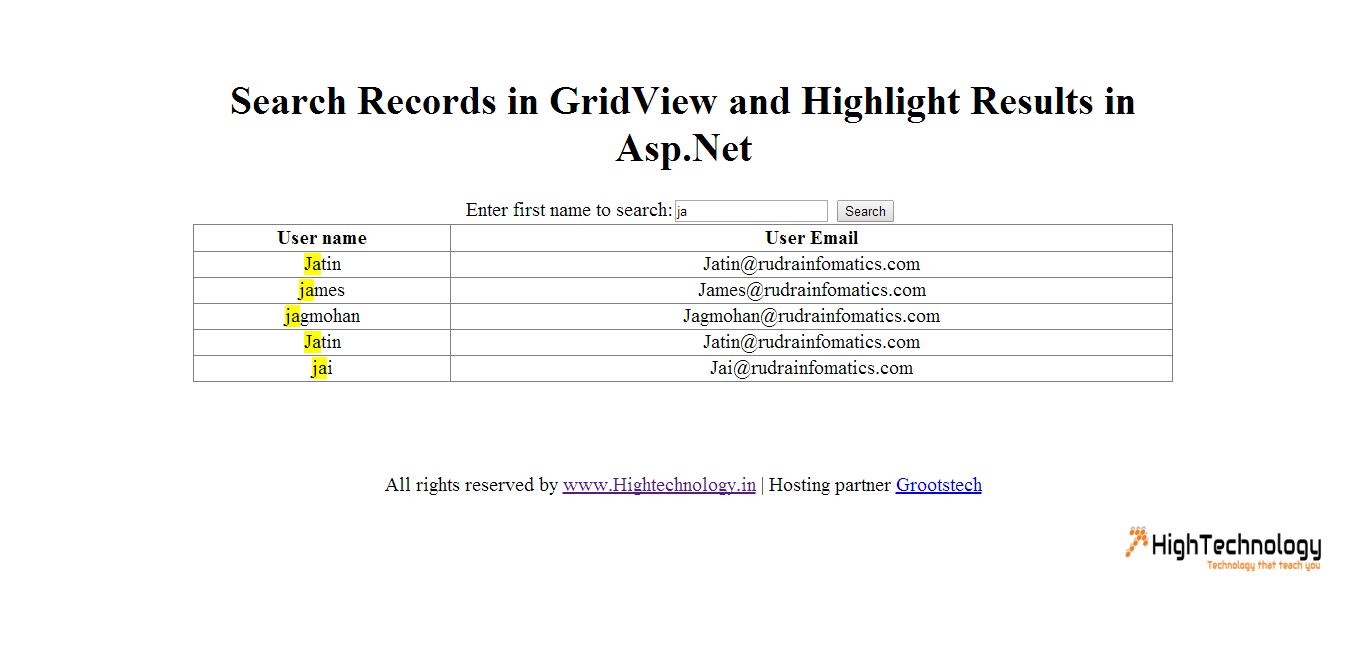
In this tutorial we will learn how to Search Records in GridView and Highlight Results in Asp.Net. Here we will use a search textbox, button and display and highlight results in the gridview. In earlier post we have discussed Total of Columns in GridView Footer in Asp.Net.
Design:
<%@ Page Language="C#" AutoEventWireup="true" CodeFile="Default.aspx.cs" Inherits="_Default" %>

<!DOCTYPE html>

<html xmlns="http://www.w3.org/1999/xhtml">
<head runat="server">
<title>Search Records in GridView and Highlight Results in Asp.Net</title>
<style type="text/css">
body {
width: 980px;
margin: 0px auto;
text-align: center;
padding-top: 50px;
font-size: 20px;
}
.highlight {text-decoration: none;color:black;background:yellow;}
</style>
</head>
<body>
<form id="form1" runat="server">
<div>
<h1>Search Records in GridView and Highlight Results in Asp.Net</h1>

Enter first name to search:<asp:TextBox ID="txtSearch" runat="server" />
<asp:Button ID="btnsearch" runat="server" OnClick="btnsearch_Click" Text="Search" />
<br />

<asp:GridView ID="grdSearch" runat="server" AutoGenerateColumns="false" Width="100%">
<Columns>
<asp:TemplateField HeaderText="User name">
<ItemTemplate>
<asp:Label ID="lbluName" runat="server" Text='<%# Highlight(Eval("username").ToString()) %>'/>
</ItemTemplate>
</asp:TemplateField>

<asp:TemplateField HeaderText="User Email">
<ItemTemplate>
<asp:Label ID="lblemail" runat="server" Text='<%#(Eval("uemail")) %>'/>
</ItemTemplate>
</asp:TemplateField>

</Columns>
</asp:GridView>
<br /><br />
<br /><br />
All rights reserved by <a href="http://www.hightechnology.in">www.Hightechnology.in</a> |
Hosting partner <a href="http://www.grootstech.com" target="_blank">Grootstech</a>
</div>
</form>
</body>
</html>
Code:
using System;
using System.Collections.Generic;
using System.Linq;
using System.Web;
using System.Web.UI;
using System.Web.UI.WebControls;
using System.Data;
using System.Data.SqlClient;
using System.Configuration;
using System.Text.RegularExpressions;
public partial class _Default : System.Web.UI.Page
{
    String strcon = ConfigurationManager.ConnectionStrings["connnn"].ConnectionString;
    protected void Page_Load(object sender, EventArgs e)
    {

        if (!IsPostBack)
        {
            BindGrid();
        }
    }
    private DataTable GetRecords()
    {
        SqlConnection conn = new SqlConnection(strcon);
        conn.Open();
        SqlCommand cmd = new SqlCommand();
        cmd.Connection = conn;
        cmd.CommandType = CommandType.Text;
        cmd.CommandText = "Select top(10) * from users";
        SqlDataAdapter dAdapter = new SqlDataAdapter();
        dAdapter.SelectCommand = cmd;
        DataSet objDs = new DataSet();
        dAdapter.Fill(objDs);
        return objDs.Tables[0];

    }
    private void BindGrid()
    {
        DataTable dt = GetRecords();
        if (dt.Rows.Count > 0)
        {
            grdSearch.DataSource = dt;
            grdSearch.DataBind();
        }
    }
    private void SearchText()
    {
        DataTable dt = GetRecords();
        DataView dv = new DataView(dt);
        string SearchExpression = null;
        if (!String.IsNullOrEmpty(txtSearch.Text))
        {
            SearchExpression = string.Format("{0} '%{1}%'",
            grdSearch.SortExpression, txtSearch.Text);

        }
        dv.RowFilter = "Username like" + SearchExpression;
        grdSearch.DataSource = dv;
        grdSearch.DataBind();

    }
    public string Highlight(string InputTxt)
    {
        string Search_Str = txtSearch.Text.ToString();
        Regex RegExp = new Regex(Search_Str.Replace(" ", "|").Trim(),
        RegexOptions.IgnoreCase);
        return RegExp.Replace(InputTxt,
        new MatchEvaluator(ReplaceKeyWords));
        RegExp = null;
    }

    public string ReplaceKeyWords(Match m)
    {
        return "<span class=highlight>" + m.Value + "</span>";
    }

    protected void btnsearch_Click(object sender, EventArgs e)
    {
        SearchText();
    }
}
Result: