DDL Triggers to Audit Database-SQL Server
In this post we will discuss how to audit database with DDL trigger or DDL Triggers to Audit Database-SQL Server. By this we can track all DDL events performing on a database, what was changed, when and by whom .
Enable TCP/IP Protocol in SQL Server Configuration Manager Using Command Prompt , How to create a database in sql server with Tsql, The database was backed up on a server running version 10.50.1600. version is incompatible with this server.
DDL events are following:
- CREATE – to create objects in the database
- ALTER – alters the structure of the database
- DROP – delete objects from the database
- TRUNCATE – remove all records from a table, including all spaces allocated for the records are removed
- COMMENT – add comments to the data dictionary
- RENAME – rename an object
Create a table that will store all records. For example I am using Testing database to store this table. DDL trigger need to created inside Testing database. This trigger will capture all DDL events and save in table.
First create a table to record all change into that:
USE [TESTING]
GO
SET ANSI_NULLS ON
GO
SET QUOTED_IDENTIFIER ON
GO
SET ANSI_PADDING ON
GO
CREATE TABLE [dbo].[ChangeLog](
    [LogId] [int] IDENTITY(1,1) NOT NULL,
    [DatabaseName] [varchar](256) NOT NULL,
    [EventType] [varchar](50) NOT NULL,
    [ObjectName] [varchar](256) NOT NULL,
    [ObjectType] [varchar](25) NOT NULL,
    [SqlCommand] [varchar](max) NOT NULL,
    [EventDate] [datetime] NOT NULL CONSTRAINT [DBChangeLog_EventDate]  DEFAULT (getdate()),
    [LoginName] [varchar](256) NOT NULL
) ON [PRIMARY]
GO
SET ANSI_PADDING OFF
Trigger:
USE [TESTING]
GO
SET ANSI_NULLS ON
GO
SET QUOTED_IDENTIFIER ON
GO
CREATE trigger [TrgrDBChangeLog]
on database
for DDL_DATABASE_LEVEL_EVENTS
as
set nocount on
If Object_ID('testing.dbo.ChangeLog') IS NOT NULL
BEGIN
declare @data xml
set @data = EVENTDATA()
insert into TESTING.dbo.ChangeLog(databasename, eventtype, objectname, objecttype, sqlcommand, loginname)
values(
@data.value('(/EVENT_INSTANCE/DatabaseName)[1]', 'varchar(256)'),
@data.value('(/EVENT_INSTANCE/EventType)[1]', 'varchar(50)'),
@data.value('(/EVENT_INSTANCE/ObjectName)[1]', 'varchar(256)'),
@data.value('(/EVENT_INSTANCE/ObjectType)[1]', 'varchar(25)'),
@data.value('(/EVENT_INSTANCE/TSQLCommand)[1]', 'varchar(max)'),
@data.value('(/EVENT_INSTANCE/LoginName)[1]', 'varchar(256)')
)
END
GO
SET ANSI_NULLS OFF
GO
SET QUOTED_IDENTIFIER OFF
GO
ENABLE TRIGGER [TrgrDBChangeLog] ON DATABASE
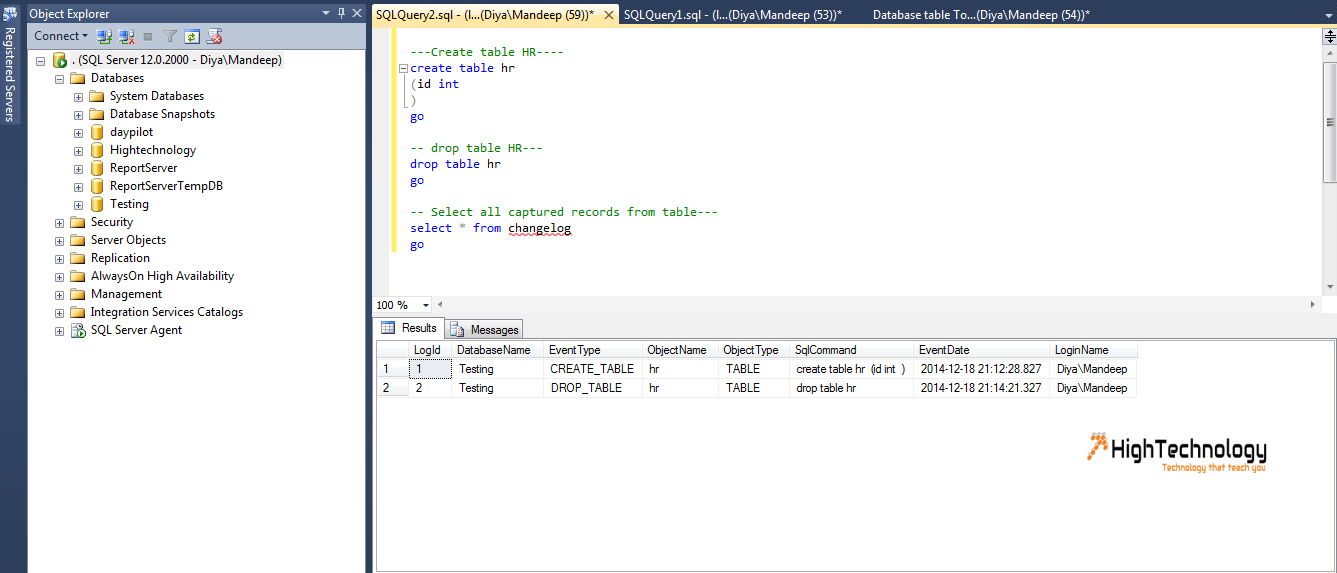
Result: